
Note: This article is a machine translation from the original Japanese post. If you notice any translation issues, please let us know.
Here is a technical breakdown of the cashless, fully self-service checkout system we built in just two days for the opening of LOPPO Art Supply Shibuya Store (an unmanned retail location).
Introduction: The LOPPO Art Supply Unmanned Store Project
LOPPO Art Supply is a brand of cel animation art supplies that started as a hobby of Takahashi, and has primarily been sold through online retail. Earlier this year, we decided to rent a small space to serve as an event venue for LOPPO Art Supply. We had planned to use one corner as a stockroom, but then the idea came up: "If we're storing inventory there anyway, why not turn it into a retail space?"
There had been requests for a physical store for some time, but securing the human resources needed for store operations had been a challenge. That's when we came up with the concept of an "unmanned art supply store." Think of it like a farm stand for vegetables, but for cel animation art supplies — a dreamlike (or perhaps insane!) place where you can buy supplies 24 hours a day, 365 days a year.
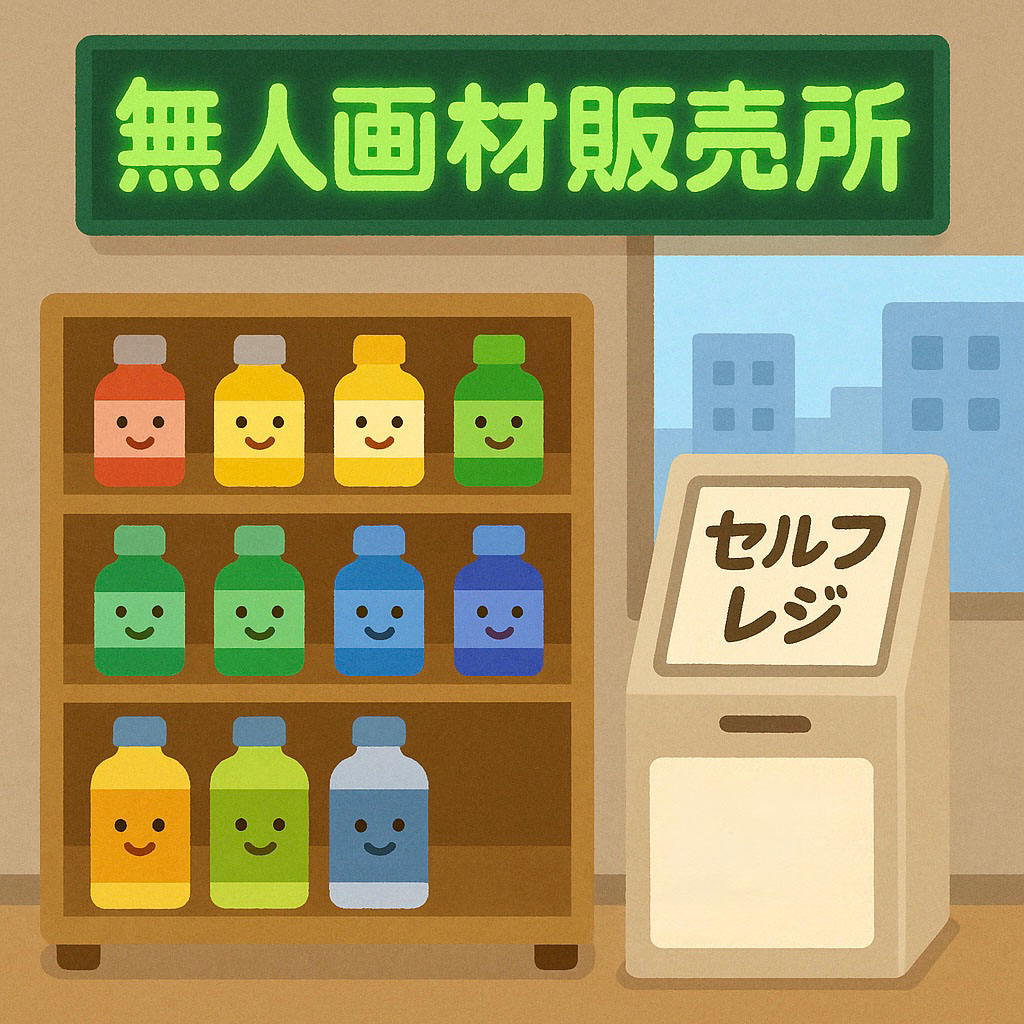 Unmanned art supply store (concept image)
1. Challenges with Existing Self-Checkout Solutions
To create an unmanned store that doesn't require on-site staff, a fully self-service checkout system is essential. For this project, we decided to support only cashless payments as a theft prevention measure.
We initially considered off-the-shelf self-checkout solutions, but encountered two major issues:
- High monthly fixed costs on top of initial setup fees
- Long settlement-to-deposit cycles
To ensure sustainability, it's important to keep fixed costs minimal while maintaining healthy cash flow. That's when we turned our attention to the Square payment system, which we had previously used at event sales.
Square supports a wide range of payment methods, charges no monthly fees (only per-transaction fees), and offers fast deposits — as early as the next business day. Additionally, the Square API enables the creation of custom applications. Since we already owned a Square Terminal, we determined that leveraging it would also keep initial costs low.
However, there was a major constraint on development. We were already overwhelmed with product manufacturing work for the store opening, and could only dedicate just 2 days to developing the self-checkout system.
2. System Design: A Secure and User-Friendly Self-Checkout
Overall Architecture
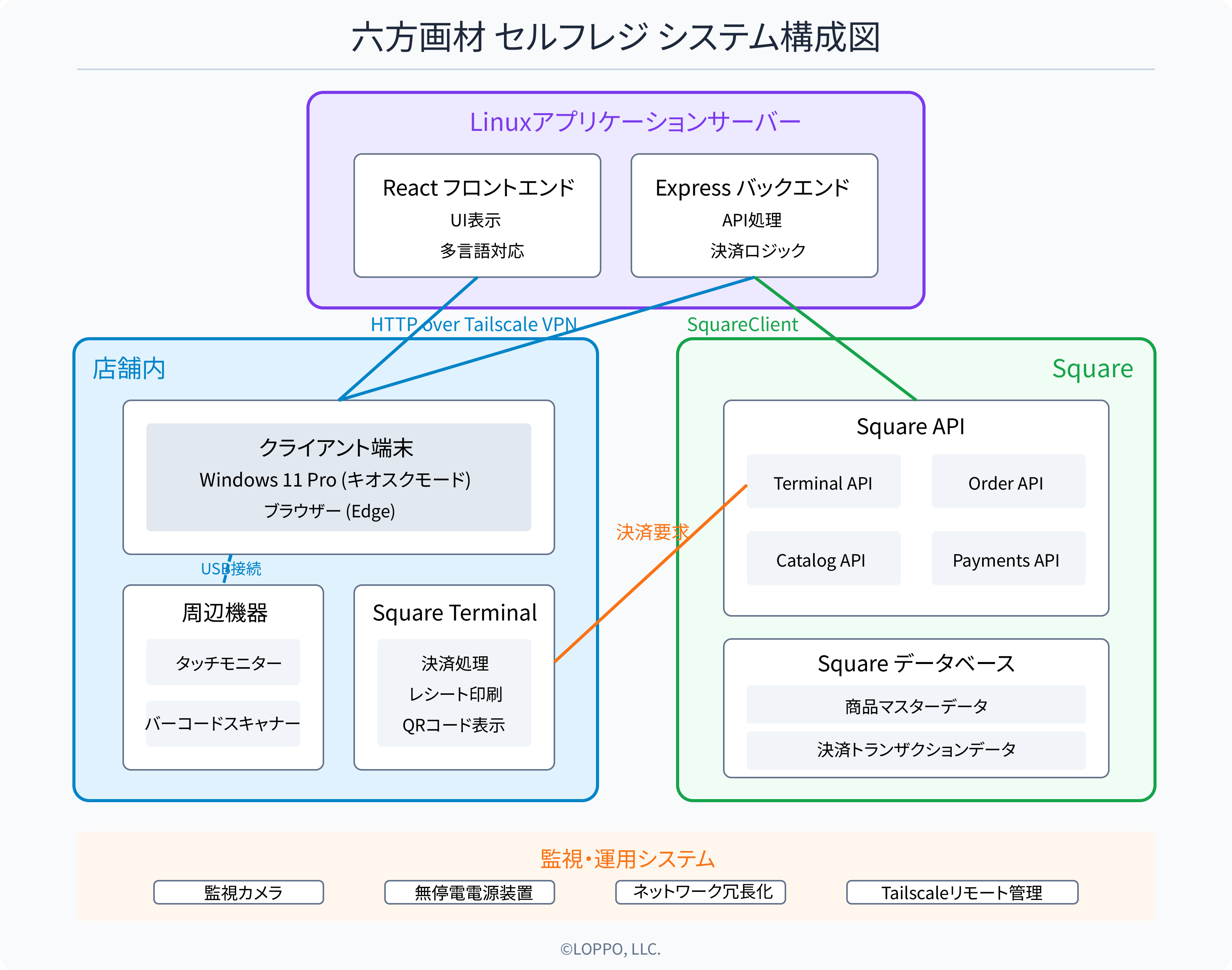
The system is composed of the following major components:
- Linux application server: React frontend and Express backend
- In-store system: Windows 11 Pro kiosk-mode client terminal, peripherals, and Square Terminal
- Square services: Square API, product master data
- Monitoring & operations: Security cameras, uninterruptible power supply (UPS), network redundancy
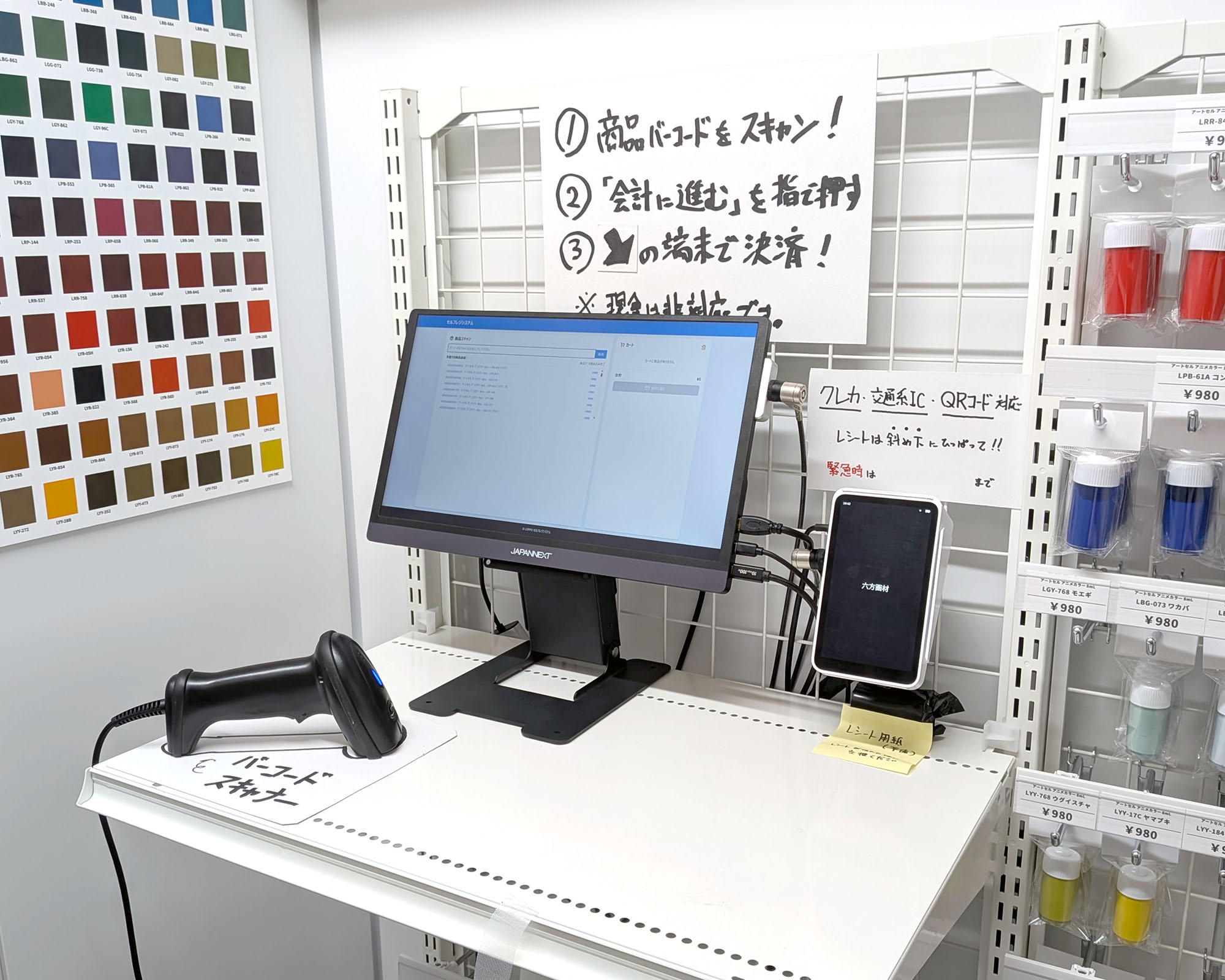
From the customer's perspective, only the touch-enabled monitor, barcode scanner, and Square Terminal are visible. The client runs in Windows 11 Pro kiosk mode, while the main application logic resides on a Linux machine located outside the store.
Security and Networking
The network operates under a VPN environment using Tailscale, which protects communication between the client terminal and the Linux server. Additionally, all devices are connected to an uninterruptible power supply for protection against lightning and power outages, and the network is configured with redundancy to ensure stable operation.
The adoption of Tailscale also makes remote maintenance easy. No local data is stored on any terminal — all data is retrieved from Square's systems.
Hardware Configuration
- Touch-enabled monitor
- USB barcode scanner
- Square Terminal (payment processing and receipt printing)
- Security camera (for real-time monitoring)
Frontend Implementation
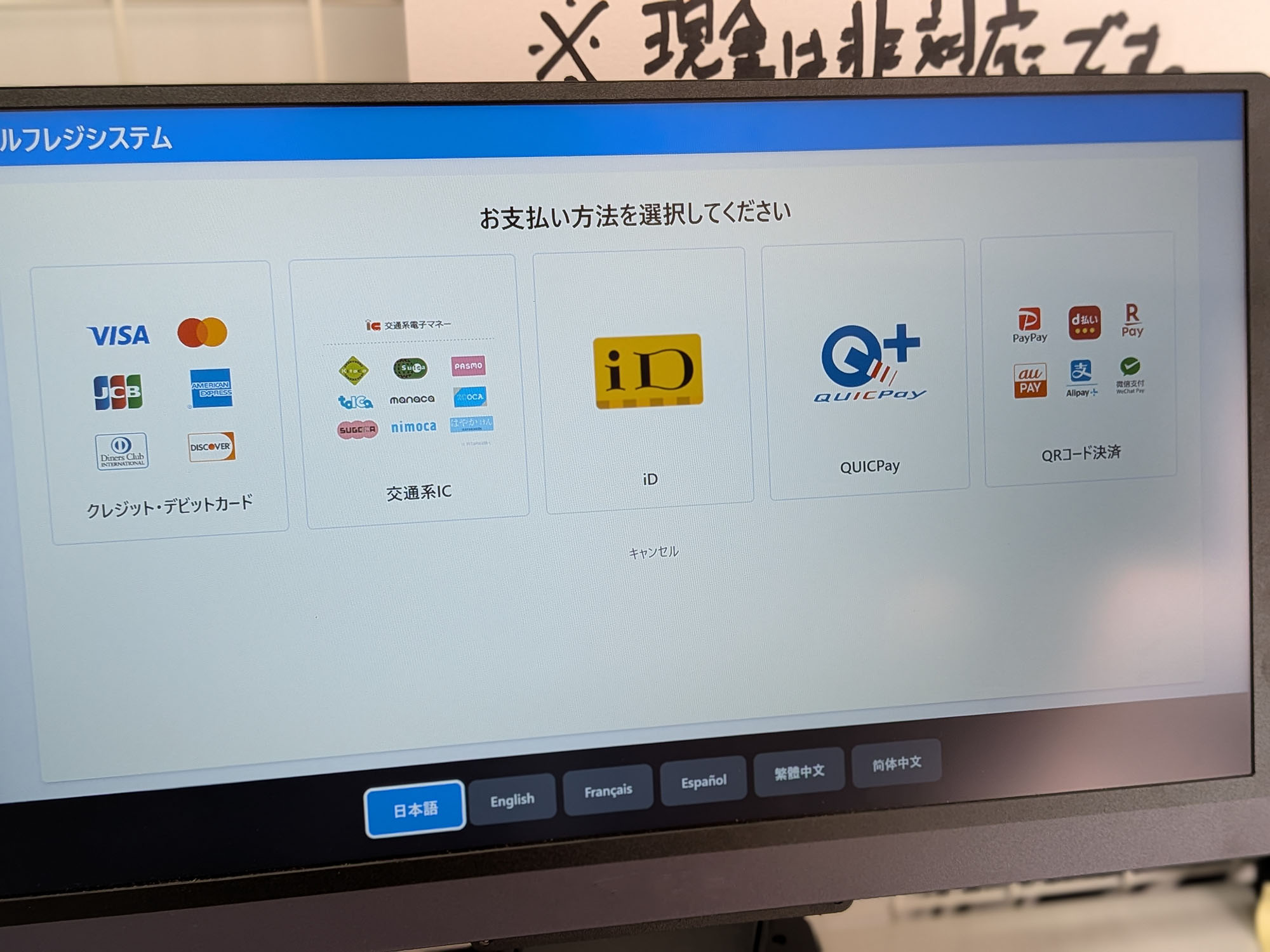 Payment method selection screen
The frontend is built with React and consists of the following main screens:
- Product scan screen
- Payment method selection screen
- Payment processing screen
- Payment completion screen
Although we use machine translation, we also implemented multilingual support, covering 6 languages: Japanese, English, French, Spanish, Traditional Chinese, and Simplified Chinese. This allows international visitors to use the system with confidence.
// Language configuration example
const translations = {
  ja: {
    title: 'セルフレジシステム',
    scanTitle: '商品スキャン',
    // ...omitted
  },
  en: {
    title: 'Self-Checkout System',
    scanTitle: 'Product Scan',
    // ...omitted
  },
  // Other languages...
};
We also designed the system to prioritize barcode scanner input, aiming for an interface that users can operate without confusion.
3. Key Points of Square API Integration
Payment Processing with Terminal API
Among the Square APIs, the Terminal API is particularly important. It allows us to send payment processing requests to the Square Terminal.
// Create Terminal checkout
app.post("/api/create-terminal-checkout", async (req, res) => {
  try {
    const { order, amountMoney, paymentType = "CARD_PRESENT" } = req.body;

    const ALLOWED = new Set([
      "CARD_PRESENT",
      "FELICA_TRANSPORTATION_GROUP",
      "FELICA_ID",
      "FELICA_QUICPAY",
      "QR_CODE"
    ]);

    if (!ALLOWED.has(paymentType)) {
      return res.status(400).json({ error: "Unsupported payment method specified" });
    }

    // Create the order first
    const orderId = await createOrder(order);

    // Create Square Terminal Checkout
    const checkoutResponse = await squareClient.terminal.checkouts.create({
      idempotencyKey: randomUUID(),
      checkout: {
        amountMoney: {
          // Amount must be BigInt
          amount: BigInt(amountMoney.amount),
          currency: amountMoney.currency,
        },
        deviceOptions: {
          deviceId: SQUARE_DEVICE_ID,
          skip_receipt_screen: true,
          show_itemized_cart: false,
        },
        referenceId: orderId,
        orderId,
        note: "Payment at LOPPO self-checkout",
        paymentType: paymentType
      },
    });

    res.json(checkoutResponse);
  } catch (error) {
    handleError("Terminal Checkout creation error", error, res);
  }
});
Diverse Payment Methods
Since Square Terminal supports a wide range of payment methods, customers can pay using their preferred method:
- Credit/debit cards
- Transit IC cards (Suica/PASMO, etc.)
- iD
- QUICPay
- QR code payments (PayPay, etc.)
Note that UnionPay cards are not supported.
Polling for Payment Status
Since payment processing takes place on the Square Terminal, we need to poll for status updates such as completion or cancellation.
// Poll for payment status
const checkPaymentStatus = async () => {
  try {
    const statusResponse = await fetch(`/api/get-checkout-status?checkoutId=${data.checkout.id}`);
    const statusData = await statusResponse.json();

    if (statusData.status === 'COMPLETED') {
      setPaymentStatus(t.paymentCompleted);
      // Completion handling
      setTimeout(() => {
        setStatus('complete');
        setCart([]);
      }, 2000);
    } else if (statusData.status === 'CANCELED' || statusData.status === 'CANCEL_REQUESTED') {
      setPaymentStatus(t.paymentCanceled);
      setTimeout(() => {
        setStatus('ready');
      }, 3000);
    } else {
      // If not yet completed, check again
      setPaymentStatus(t.processing);
      setTimeout(checkPaymentStatus, 2000);
    }
  } catch (error) {
    console.error(t.statusCheckFailed, error);
    setPaymentStatus(t.statusCheckFailed);
    setTimeout(() => {
      setStatus('ready');
    }, 3000);
  }
};
Product Master Data Management
All product information is registered through Square's dashboard and retrieved via the API. This simplifies operational tasks such as adding products or changing prices.
app.get("/api/catalog-items", async (_req, res) => {
  try {
    const TYPES = "ITEM,ITEM_VARIATION,CATEGORY,IMAGE"; // List all required types
    //------------------------------------------------------------------
    // 1. Load everything
    //------------------------------------------------------------------
    const objects = [];
    for await (const obj of await squareClient.catalog.list({ types: TYPES }))
      objects.push(obj);

    //------------------------------------------------------------------
    // 2. Build maps for CATEGORY / IMAGE / VARIATION first
    //------------------------------------------------------------------
    const imageMap     = {};
    const categoryMap  = {};
    const variationMap = {};

    // ...omitted (map building logic)

    //------------------------------------------------------------------
    // 3. Expand ITEMs and embed info using the maps built above
    //------------------------------------------------------------------
    const filtered = objects
      .filter((o) => o.type === "ITEM")
      .map((item) => {
        // ...omitted (data transformation logic)
      })
      // -- Apply requirement filters here --
      .filter(
        (item) =>
          !item.isArchived &&
          item.categoryNames.includes("六方画材")
      );

    res.json(filtered);
  } catch (error) {
    handleError("Catalog item retrieval error", error, res);
  }
});
4. Rapid Development with LLMs
The standout feature of this project is that it was completed in just 2 days. This was made possible by leveraging LLMs (Large Language Models).
Development Time Breakdown
- Core system development: ~2 hours
- Refinement & UI adjustments: ~4 hours
- Testing & deployment: remaining time
How We Used Claude 3.7 Sonnet
We primarily used Claude 3.7 Sonnet during development to streamline implementation. It handled not only application logic but also UI design effortlessly, and even prepared setup documentation — a truly comprehensive assistant. The LLM's suggestions were especially valuable for multilingual support code and Square API integration.
We also tried combining ChatGPT 4o and ChatGPT o3, but when it came to understanding web applications, they were no match for 3.7 Sonnet.
Practical Examples of LLM Usage
This is a common caveat when using LLMs for development, but it's difficult to use generated code as-is — it's essential to understand it and make necessary modifications. For example, the following corrections were needed for the Square Terminal API integration:
- Adding payment methods: The LLM-generated code only supported credit card payments, so we needed to add a payment method selection screen
- Error handling: The handling of Terminal payment cancellation events was incorrect, so we fixed it based on the API documentation
- Security: Some inter-application communication was using insecure protocols, so we built a private VPN to secure the communication path
The LLM provided the basic code structure, but adjustments for production readiness had to be done manually.
5. Internationalization and Usability
Multilingual Implementation
To accommodate international visitors, the system supports 6 languages: Japanese, English, French, Spanish, Traditional Chinese, and Simplified Chinese. Language settings are managed within React components, and all on-screen text is retrieved from translation objects.
// Language selection state management
const [language, setLanguage] = useState('ja'); // Set default language to Japanese
// Get language settings
const t = translations[language];

// Usage example
<h1 className="text-4xl font-bold">{t.title}</h1>
<p className="text-lg text-gray-700 mb-6">
  {t.scanDescription}
</p>
Usability Considerations
We aimed for a user experience similar to self-checkout machines at supermarkets and convenience stores, incorporating the following design choices:
- Barcode scan priority: Keyboard input is accepted anywhere on the page, always prioritizing barcode scanner input
- Large buttons: Button sizes optimized for easy touch operation
- Clear feedback: Easy-to-understand messages showing operation results
Through these design choices, we believe we achieved an interface that users can operate without confusion.
6. Operational Considerations
Real-Time Monitoring and Incident Response
Network cameras are installed in the store, allowing us to check the store's status in real time. If a problem occurs, customers can call the phone number posted at the storefront for assistance.
When an operational anomaly is detected, we have a system in place to arrive on-site within 30 minutes to 2 hours. Additionally, as a fallback in case the payment terminal is not working, we can provide a payment link after the fact to complete the transaction.
For stable operation, we also have UPS power backup, network redundancy, and periodic reboots during idle periods.
There was one incident where the client's power cable came loose because it wasn't fully inserted, but since then the system has been running very stably.
7. Results and Impact
Expanding Sales Opportunities
The opening of the unmanned store allowed us to secure valuable 24/7 sales opportunities near a central city train station. The greatest achievement was meeting the demand for a physical store while overcoming human resource constraints.
Payment Method Trends
All implemented payment methods are being used fairly evenly, but the most popular in order are:
- Transit IC cards
- QR code payments (PayPay, etc.)
- Credit cards (contactless payments)
8. Future Plans and Expansion
Expanding to Online Sales
The current LOPPO Art Supply online store is built on BASE, but we plan to migrate it to a Square API-based system. This will not only reduce transaction fees but also improve the product purchase flow and unify inventory and sales management between the physical store and online sales.
Furthermore, we would like to offer the option to buy online and pick up in store.
Conclusion: If You Can Make Paint, You Can Build a Checkout System
LOPPO has been handcrafting reproductions of various cel animation art supplies, and this time we handcrafted a checkout system.
Software applications can sometimes be built relatively easily by leveraging existing APIs and LLM assistance, as demonstrated here. That said, we never imagined a checkout system could be built this easily, and it was a tremendously educational experience.
Key Principles
- Leveraging existing services: Maximizing the use of existing platforms such as Square API
- Utilizing support tools like LLMs: Proactively adopting tools that boost development efficiency
- Focusing on the minimum necessary scope: Keeping the implementation simple by concentrating on essential features
We hope this article serves as a useful reference for anyone interested in building a self-checkout system or considering the use of Square API.
The complete source code for the system we built is available on GitHub.